Vehicle range predictions & route planning

Plan a route and see the battery % you'll arrive with, before you leave.

request access ↓

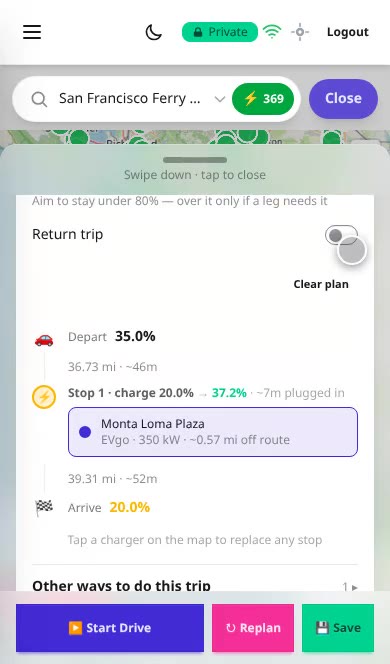
San Francisco to Santa Cruz, 75 miles: the prediction, then the charging stop.

What it does

A prediction specific to your vehicle: the battery % you'll arrive with, and how much energy a planned route uses, over its hills, at the speeds you drive, in the outside temperature.

A planned trip: depart at 35%, one charging stop from 20% to 37.2% at a 350 kW charger, arrive at 20%
Plan a route, with optional charging stopsSee the battery % you'll arrive with. Turn chargers on and the plan includes where to charge.
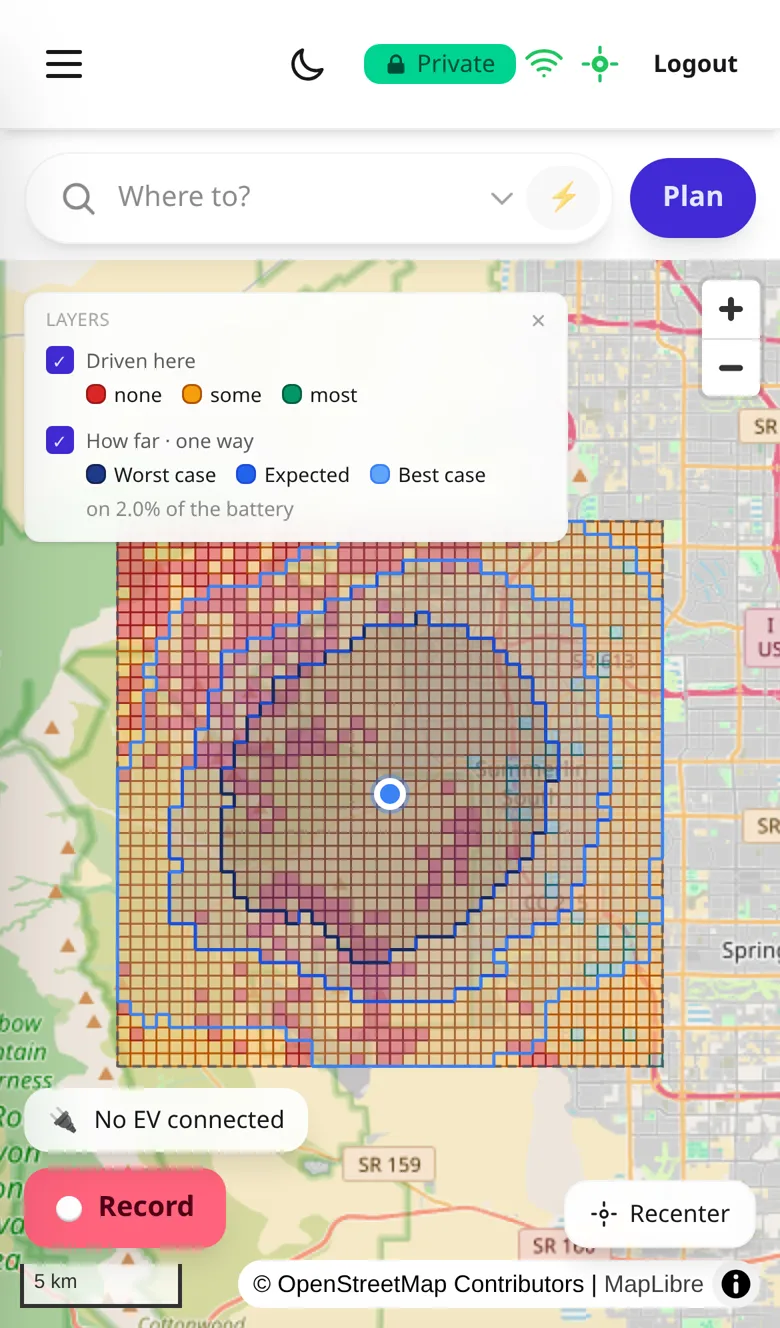
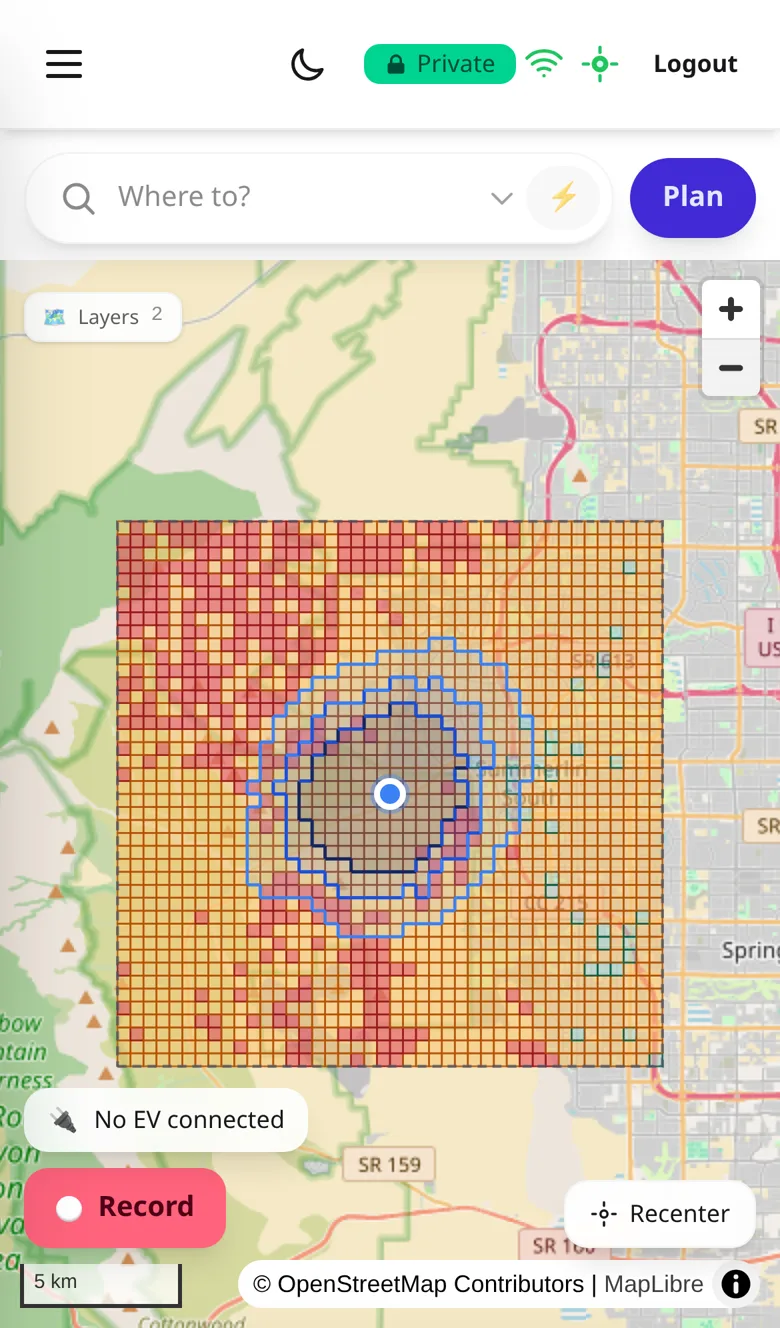
Map of a cached region with three contours around the driver and the Layers key open: Driven here (none, some, most) and How far, one way (worst case, expected, best case) on 2.0% of the battery
How far you can reachUseful offroad. Cache a region and the map draws how far your battery % reaches, one way or there and back.
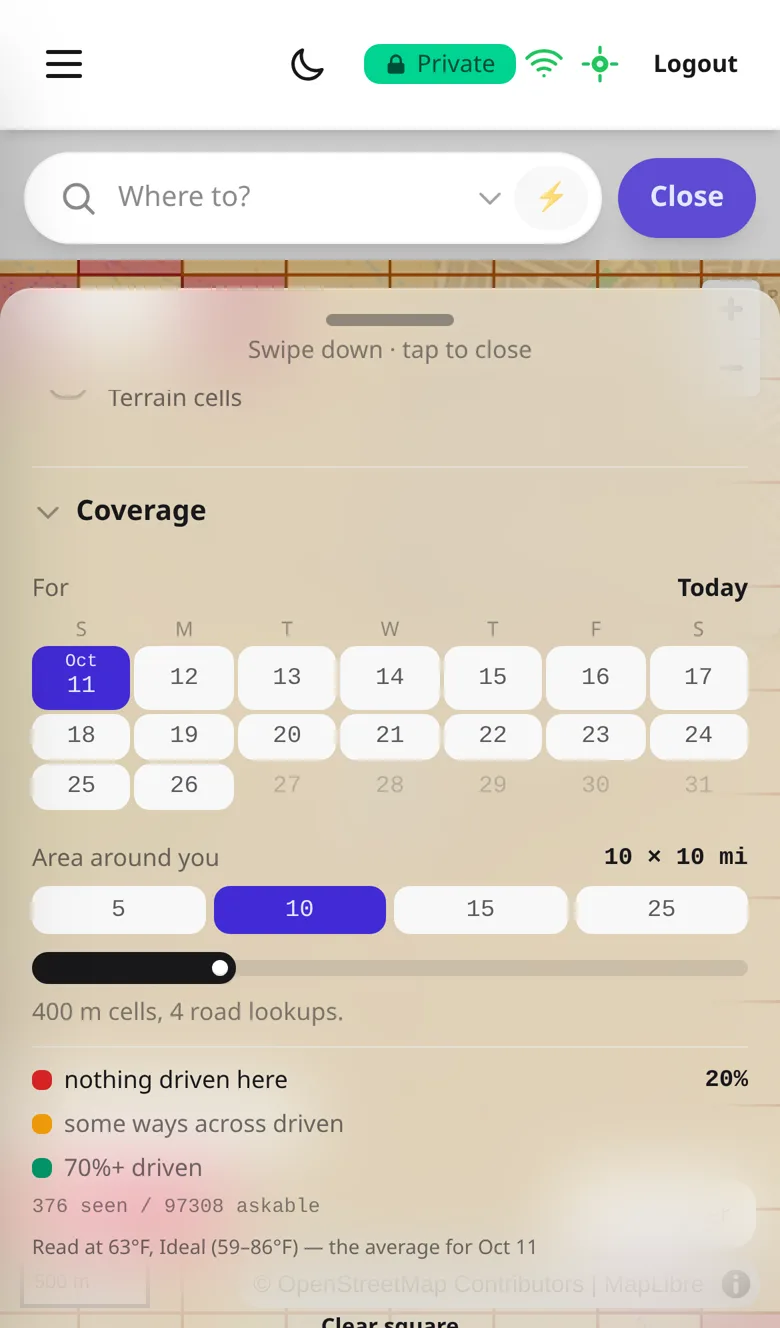
Caching a region: a calendar to pick the day, sizes from 5 to 25 miles, and the temperature the region was read at
The day you're goingPick the day, up to sixteen days ahead, and it uses that day's forecast temperature.
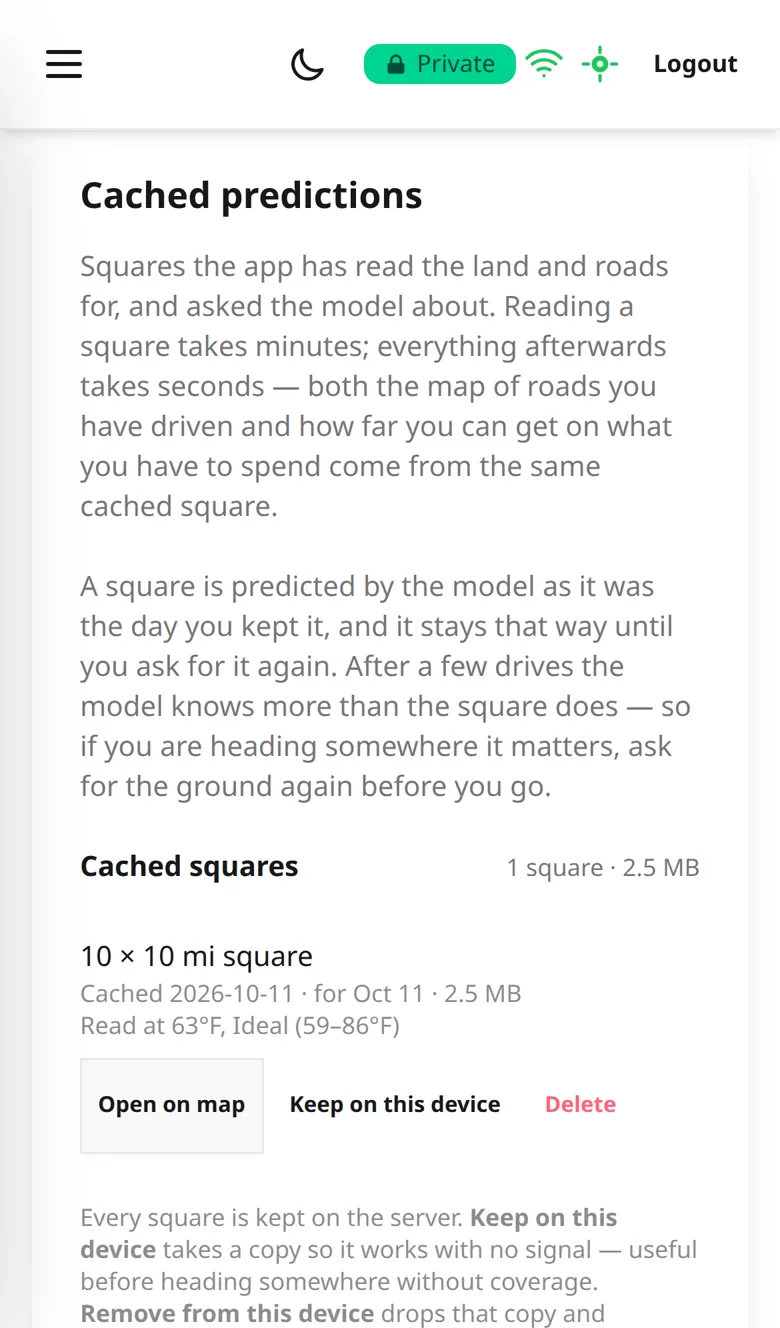
The Cached Maps page listing one 10 by 10 mile region with Open on map, Keep on this device and Delete
Plan ahead for no signalPut a cached region on your phone before you go, and its map and predictions still work.

Why it's different

You can check it

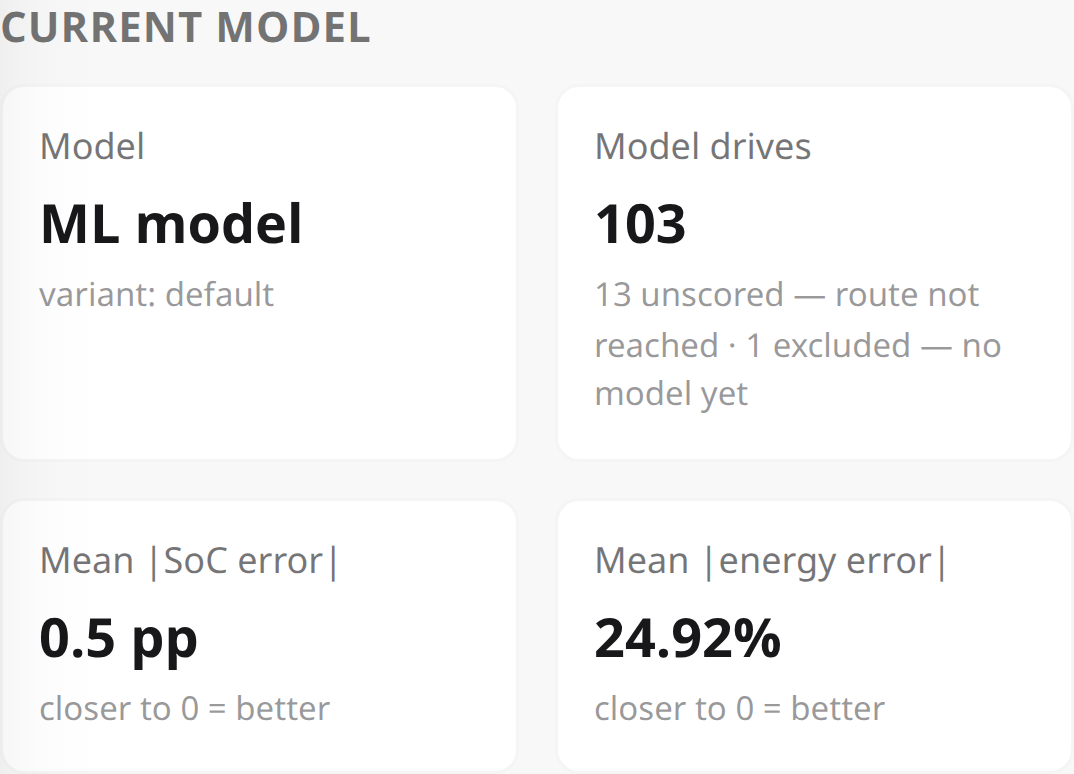
Model Health, current model: 103 model drives, mean SoC error 0.5 percentage points
103 drives · arrival battery % off by 0.5 points on average
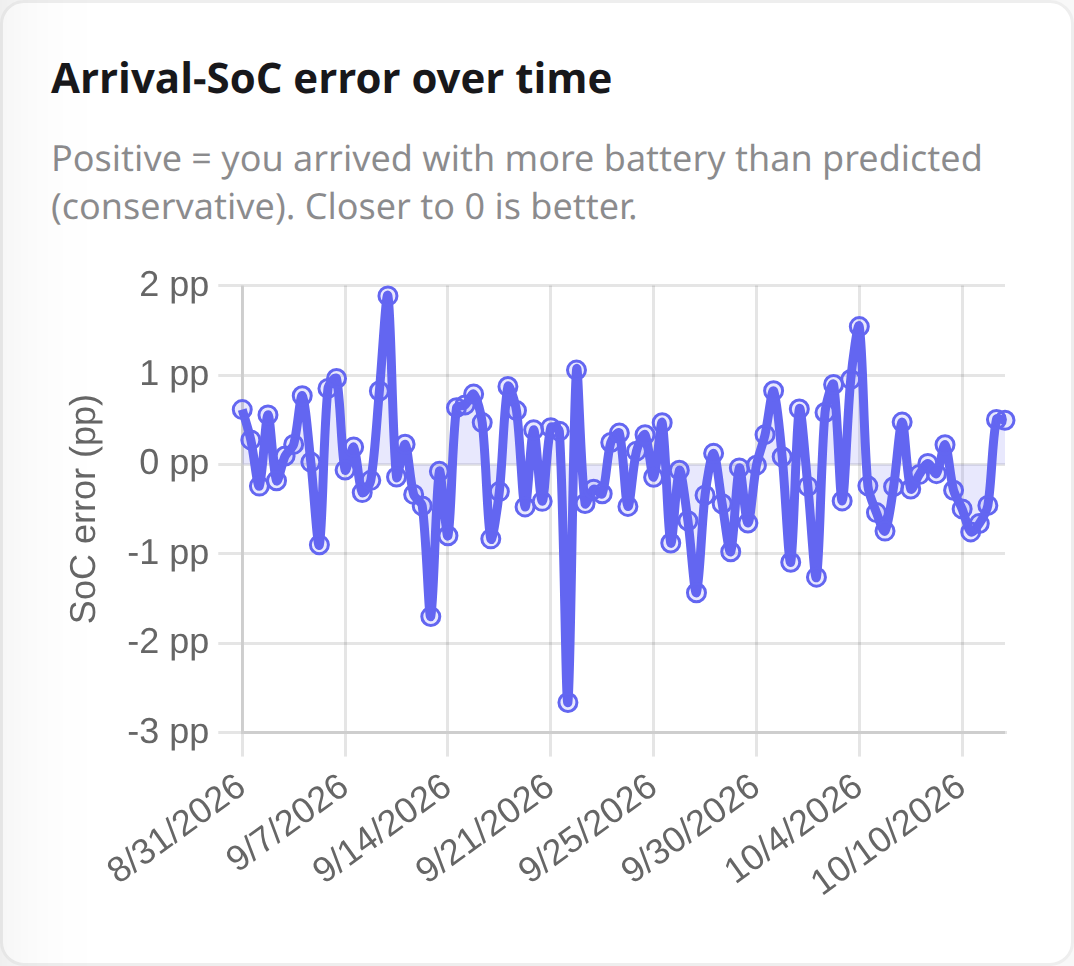
Chart of arrival battery % error for each drive from 31 August to 10 October 2026, mostly within one point of zero
The error drive by drive. Above zero means arriving with more battery than predicted.

My story

Several years ago, as a new Rivian owner, I was excited to go out on off-road adventures. To road trip, I had to do back-of-the-napkin calculations: how far I could safely drive between fast chargers, and which off-road locations I could reasonably reach from the nearest one. That one fast charger acted like a lifeline, and I had to estimate how far I could drive out and back to it. Exploring unmapped routes I hadn't accounted for would cost me extra battery %. This took a lot of the adventure out of the adventure, but added a new one: navigation and pen-and-paper range estimation.

My background is in mathematics and physics, and I've worked as a data scientist for many years. I invented a new machine learning algorithm specifically to do what I had been doing crudely and inefficiently by hand. It wasn't until more recently that I was able to develop it into a fully fledged application that is stable and functional.

The core algorithm I invented is unchanged. It's the piece I'm most proud of. It was an inspired idea: very simple, and robust enough for this kind of application.

I have now solved my own problem. I use the app daily, and the numbers on this page show exactly how reliable the model can be with plenty of driving. I use it to plan trips and have peace of mind about how far I can go and still get back.
The details

How it learns your vehicle

The model is yours

  • One model per driver. Your predictions come from a model that learns only from the drives you record, in your vehicle. It is not an average of everyone who owns the same vehicle.
  • A vehicle's own estimate can't tell you that. A manufacturer's arrival % gives you no way to see whether it is tuned to you or to all its drivers, or whether it is getting any better.

What it learns about you

  • How much battery % your vehicle uses on climbs and descents, at different speeds, and at different temperatures.
  • How much battery % your vehicle uses while stopped during a trip, with heating, cooling and its other systems running.
  • Seasons. Temperature strongly affects an EV's battery. The more seasons you record in, the more of the year it knows.

How it gets better

  • Your first prediction comes from physics. Before you've recorded a drive, the app works out the battery % from the physics of moving your vehicle over the route. From the first drive you save, the predictions come from your own model.
  • Every recorded drive teaches it. When you save a drive, the model is updated from the battery % your vehicle actually used.
  • The cost: you have to connect your vehicle and record your trips. It gets more accurate the more you record.
Planning a trip
  • Arrival battery %. Plan a route on the map and it tells you the battery % you'll arrive with.
  • Charging stops. Turn chargers on (the ⚡ button in the search bar) and the plan includes where to charge. You set the battery % you want to arrive with, how full to charge, the slowest charger you'll accept, and which networks.
  • The region you can reach and still get back from. Cache a region on the map, either a square around you or a strip along your route, and it shows how far you can go in it and return.
  • The weather. A planned route uses the forecast along the way, for the time you'll be at each part of it. When you cache a region you pick the day, up to sixteen days ahead, and it uses that day's forecast temperature.
  • Cached for offline, when you choose. Saving a route or a region puts it in your account. To use it with no signal you also cache it on your phone, from the Cached Maps page.

It plans with real speeds

  • Speed limits, road by road. Speed changes how much battery % a route uses, so the app plans with the posted speed limit of each road on your route.
  • Then your own speeds. Once you've recorded enough on a category of road, such as highways or residential streets, it plans with the speed you typically drive there in place of the limit.
One way on 2% of the battery: worst case, expected and best case
The same cached region with three smaller contours around the driver
The same 2%, there and back: how far you can go and still return
Recording a drive, and what happens if you lose signal
  • The prediction stands. It is made before you leave and doesn't change. If you take a different road, only the new part gets a new prediction.
  • Hands-free, if you turn it on. It is off unless you switch it on in Settings. Then a planned trip starts recording when you set off, and stops and saves when you arrive.
  • In a cached region with no signal. The map and the predictions you cached still work.
  • If the signal drops mid-drive. The phone keeps recording and still knows which road you're on along your route, because the roads beside it were stored when you planned. When you stop, the drive is saved on the phone and sent once the signal is back. The one thing it can't do without signal is plan a new route if you leave yours.
Vehicle networks it works with
  • Working today: Rivian and Hyundai. You sign in to your vehicle's account and the app reads the battery % from it.
  • Any EV can be added. The model isn't built per manufacturer; it learns whatever vehicle you drive from your recorded drives. A new manufacturer only needs its connection added.
  • Next most likely: Kia and Genesis. They use the same connected-vehicle network as Hyundai. The Kia connection is started but not finished.
  • Others need an owner to test with. VW's sign-in is currently blocked, and Tesla requires approval as a partner before a connection can be built. If you drive one and want yours connected, say so in the access request below.
  • More than one vehicle. An account can hold several vehicles; you pick which one is active, and recordings go to that one.
  • Try it first. A demo vehicle lets you use the app without connecting your own.
Runs in any browser, with an Android app; no iPhone app
  • It's a web app. It runs in the browser on a phone, tablet or computer, and can be added to a phone's home screen. Nothing to install from a store.
  • Android app. The same app, and it keeps recording with the screen off.
  • One limit: in a browser, including on an iPhone, a drive only records while the screen is on. There is no iPhone app.
Privacy
  • Privacy, on by default. Where you drove is deleted once the drive is saved. The app keeps distance, elevation, speed and energy. You can turn that off.
Where it's slow or can fail

Some key services are free ones, and that shows sometimes

  • Routes can look odd. The route line comes from a free public routing service. The app doesn't draw routes itself, so an odd route is that service's choice.
  • The first prediction after a break can be slow. The prediction engine runs on a free server that goes to sleep when unused. Waking it takes most of a minute, and the app tells you it is waking. After that, a route's prediction comes back in seconds.
  • Caching a region takes minutes, once. A cached region is a square around you, or a strip along your route, that you choose to store. The first time, the app gathers that region's elevation and roads from free services that only allow slow requests. Once it is cached, everything you ask about that region is answered straight away, including with no signal.
  • A service can be down or slow. Routing, elevation, roads, weather, place search and chargers are all free outside services.

What the app does about that

  • Every one has a backup. Routing, elevation, place search and chargers each have a second source the app switches to.
  • Answers are kept. Once an elevation, a road or a forecast has been fetched, it is stored, so the same place isn't asked for twice.
  • It never fills a gap with a made-up value. If the weather or road data can't be had, the app records it as missing.
  • A recorded drive is not lost to any of it. A drive is stored on your phone first, and the work on it is retried until it goes through.

You have to record your trips

  • Recording is how it learns. With your vehicle connected, each trip you record teaches the model. Trips you don't record teach it nothing.
  • It is less accurate at first and improves with each recorded drive.
The beta, and what it costs

Access is granted by hand while the beta is small — that keeps it stable and lets me hear what early users actually need. There's no cost during the beta, and no obligation once you're in.

To be upfront: some of the key services the beta relies on are free ones, with limits. That keeps it free for you — but also caps how many people it can serve at once, so access grows gradually. A fully hosted version with room for everyone would carry real running costs, so expect a paid option down the line. Early beta users will always be dealt with fairly.

Request access

It is a private beta: access is by invitation, and free. Tell me a little about what you drive, and I'll get you onto the whitelist.

Your details are only used to set up access — never shared or made public. Site usage stats are anonymous.

Already whitelisted? open the app ↗